
The best start if you want to assess the web panel, delivery logic, history and critical alert modes.
Deployment-ready • LAN-first • Web panel • Read receipts
Windows + LAN + web panel
Business / on-premise deployment
SourceForge Business-ready
One premium JNL Software product line. Notifications that actually reach people.
Notification Delivery System is a deployment-ready messaging platform for Windows environments and LAN networks. It combines a web panel, read receipts, event history, audience segmentation and critical delivery modes, which makes it suitable for both day-to-day internal communication and urgent operational scenarios.
Administrators stay in controlDelivery, recipient groups and message history are managed in one view.
You know who has seen itReceipts and statuses make internal communication easier to verify.
Deployment without compromiseA LAN-first model that fits demanding operational environments.
A single premium JNL Software product style — ready for business presentation, product demos and deployment talks.
Product preview • Web panellive product / LAN
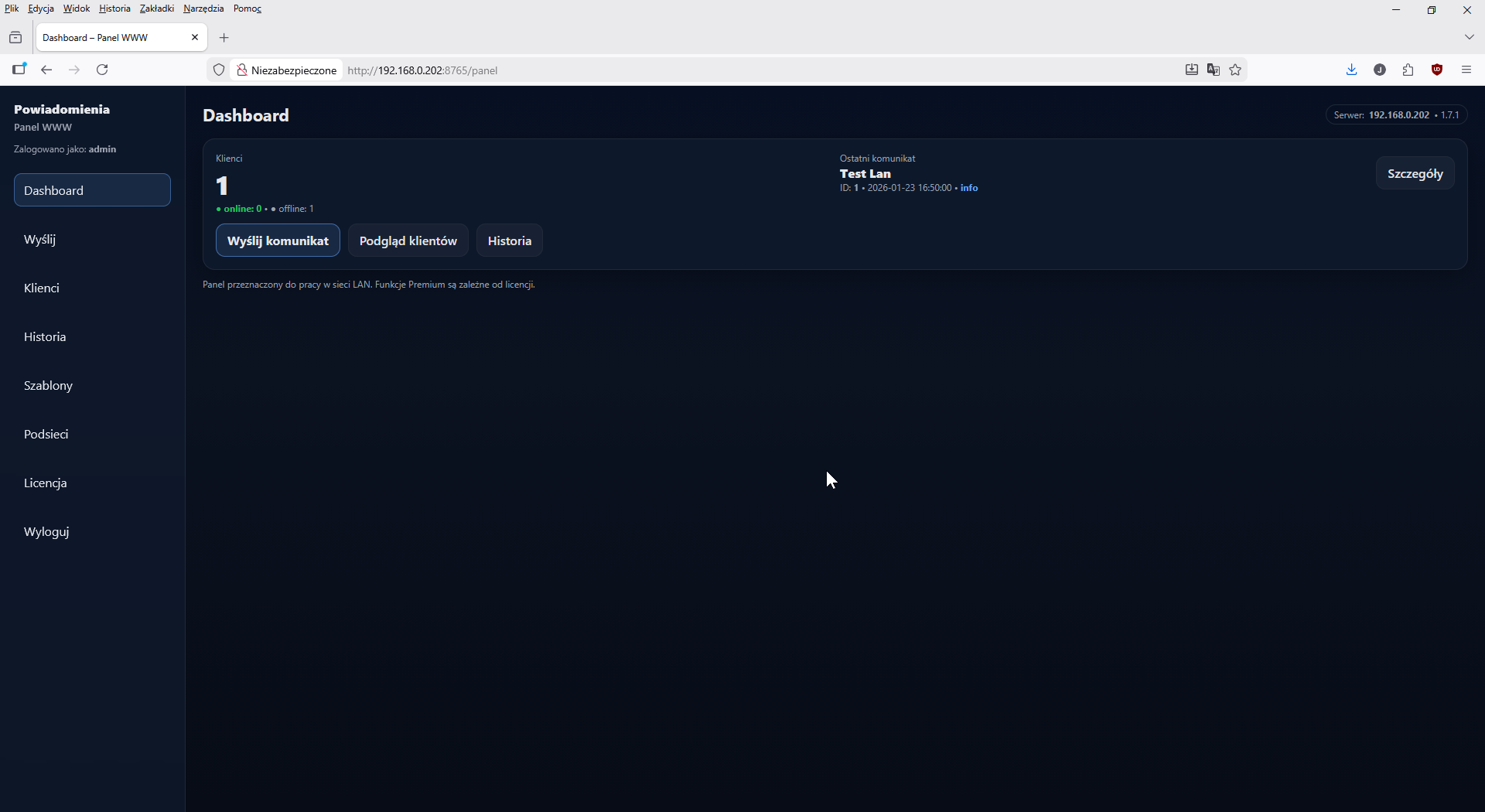
Product visibility • SourceForge Business
The Notification Delivery System is now prepared for SourceForge traffic — with a clear path to download, request a demo and start a business conversation.
It is a subtle but important signal for visitors: the product already has a polished product page, a dedicated demo & business landing page and a separate SourceForge block, so the path from interest to action is already in place.
The shortest path to a decision
Demo, quote or deployment discussion — choose the right starting point.
For organisations that already know the scale of the environment, the number of stations and the expected rollout model.
A good route when extra modules, security, role-based access and on-premise delivery matter.
What organisations gain
Clear value for buyers: speed, operational control and a communication process that is easier to govern.
Immediate message delivery
Notifications reach user workstations in real time, for both routine and urgent situations.
You know whether the message was noticed
Statuses and receipts show who saw or acknowledged the message.
Infrastructure fit
A LAN-first model: server + Windows clients + web panel. Segmentation, groups and event history.
Who this product is for
The system works best where information must arrive quickly and administrators need a clear, auditable communication trail.
Healthcare and sensitive operational environments
For operational alerts, outages, urgent organisational changes and critical communications that must be acknowledged.
IT, administration and back-office teams
For clean, auditable communication with end users, without depending on scattered calls, email threads or manual confirmation.
Organisations that require on-premise deployment
The system fits LAN-first and security-conscious environments where local control, history and administrative visibility matter.
Designed for environments where control matters
Notification Delivery System fits organisations that want to organise operational communication — from everyday informational messages to urgent and critical alerts.
Why this operating model works so well
The solution is structured so administrators keep control while end users receive clear messages without communication chaos.
Clear deployment architecture
Server, Windows clients, web panel and LAN workflow create a clear and predictable operating model.
Features that matter in daily operations
Read receipts, history, segmentation, critical mode and templates help reduce chaos and improve response across teams.
A package that fits the organisation
You can start with a simpler deployment or move directly to Business or Enterprise, depending on the environment.
Available in Polish and English
The bilingual presentation makes the product easier to use with local teams and English-speaking partners.
Key features
Designed to work in real environments and give administrators clarity and time to handle incidents.
Web panel in LAN
Centralised management of delivery, history, receipts and clients — directly from the browser inside the local network.
Receipts and statuses
You know whether the message was noticed. Statuses support critical and organisational workflows.
Critical mode
Critical notifications can take over the full screen so nobody misses them.
Message templates
Standardised content and quick actions. Fewer errors, faster response.
Segmentation and groups
Send to a selected subnet, group or workstation set — without blasting everyone.
History and audit
You see what was sent, when and to whom. Useful for incident analysis and communication governance.
The biggest leap: the web panel
The administrator no longer has to move between workstations. Delivery, statuses, receipts, the client list and history are all in one place. An ideal fit for LAN deployments.
How it works (in short)
Without exposing internal implementation details — a high-level view of the LAN workflow.
LAN workflow diagram
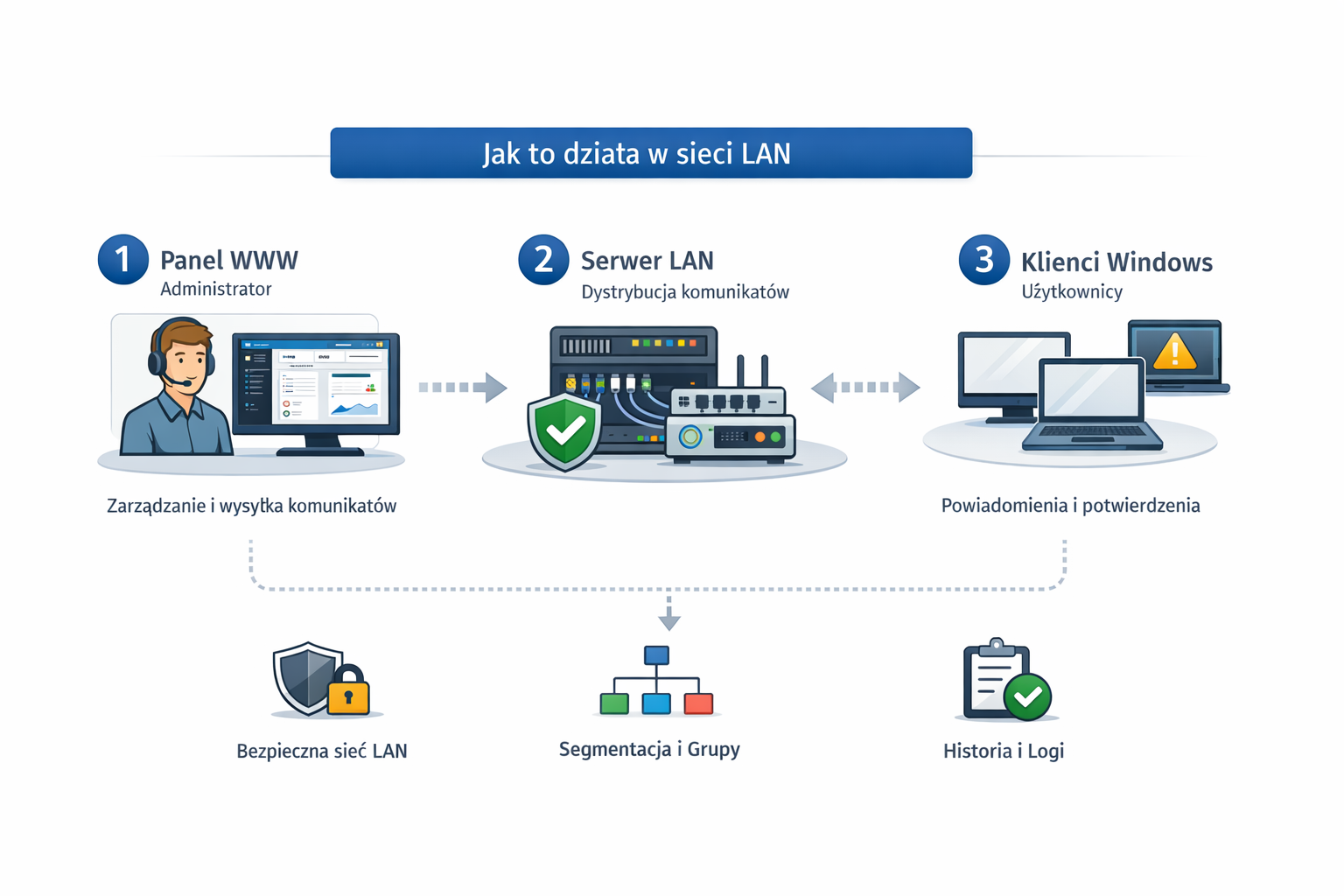
Web panel → LAN server → Windows clients + read receipts + history.
What it means in practice
- Administrator sends a notification from the web panel (LAN).
- Server distributes notifications to clients inside the local network.
- Windows clients display notifications (INFO / WARNING / CRITICAL).
- Read receipts return to the server and history is written to logs.
- Segmentation allows notifications to be targeted to selected groups and workstations.
Tip: click the diagram on the left to zoom in.
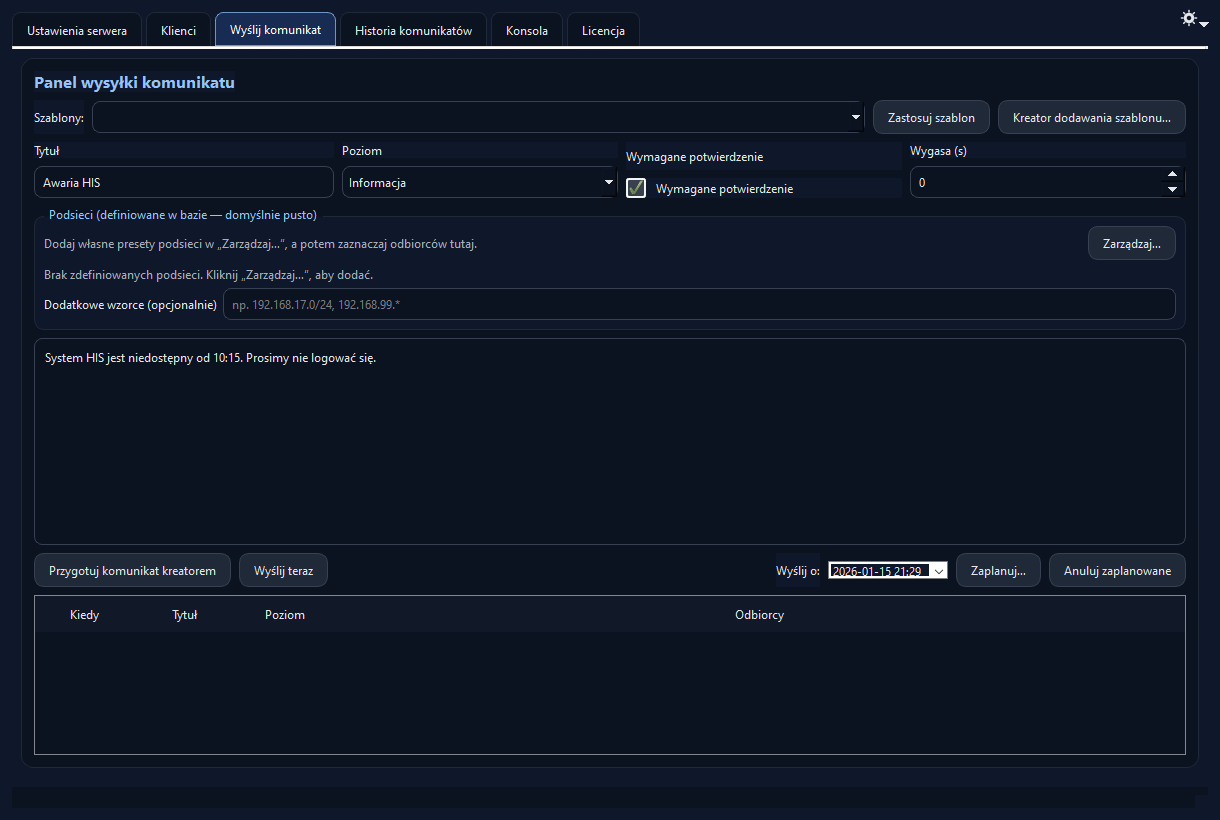
Example web-panel delivery screen.
Web panel — administration the professional way
The panel is designed for administrators working in a browser. It runs in the local network and lets you send notifications quickly, check read receipts and review history.
1
Send a message
INFO / WARNING / CRITICAL — to a group or selected workstations.
2
Clients receive it
Toast / window / full-screen mode — depending on severity.
3
You get receipts
You see who acknowledged the message and when — no guessing and no phone chasing.
Built for LAN by default
Fast deployment
Clear history
System screens (real product, real UI)
Instead of mock-ups — a real product. Click to enlarge the screenshot.
User-side notification window
Click a mode to preview the 3 notification variants.
Tip: click the image above to enlarge it.
Delivery and engagement models
The deployment package can be adjusted to the size of the environment, administrative needs and required level of control.
Standard
Server + clients + core LAN communication. A strong entry-level option for smaller internal rollouts.
Business
The most marketable package: web panel, history, read receipts, segmentation and convenient administration.
Enterprise
Extensions for security-driven environments, larger estates and deployment scenarios with custom requirements.
Deployment
Fast and calm — a typical deployment path in a LAN environment.
1
Initial planning
Addressing, segmentation (subnets/groups) and notification / receipt policy.
2
Server setup
Physical machine or VM. Port and security configuration.
3
Windows clients
Deployment on workstations and validation tests (INFO/WARN/CRIT).
Operating mode: LAN
Most common scenario: operating inside a closed local network without exposing services to the internet.
Success criteria
Notifications arrive, receipts are recorded, history stays readable and the admin works from the web panel.
Want to discuss deployment in your organisation?
We can prepare a variant that matches the number of workstations, administrator workflow and security requirements in your environment.